Tritonix Investment Agent
Tritonix Investment Agent
This guide is organized around common investing questions, so you can quickly see how Tritonix Investment Agent can help in different research situations.
If you want the broader capability map first, start with AI Agent Guide.
What It Is Best At
Tritonix Investment Agent is best used as an everyday research companion for questions like:
- What changed today for a company, sector, or theme?
- What matters in the latest earnings or filing?
- Which assets fit a specific screen?
- What does a macro event mean for stocks, rates, crypto, or commodities?
- Can you turn scattered information into a clean summary or report?
In most cases, you ask in plain language and the Agent chooses the right data sources for you.
1. Company and Ticker Research
Use this when you want to understand a company or asset quickly without opening multiple tabs.
What the Agent uses
- Live quotes and price context
- Financial statements and filings
- News and market calendar data
- Prior memory from your earlier work
Example questions
- "Give me a quick update on Nvidia before the open."
- "What are the key takeaways from Apple's latest earnings?"
- "Explain Tesla to me like I'm new to the stock."
- "Compare Microsoft and Amazon on growth, margins, and valuation."
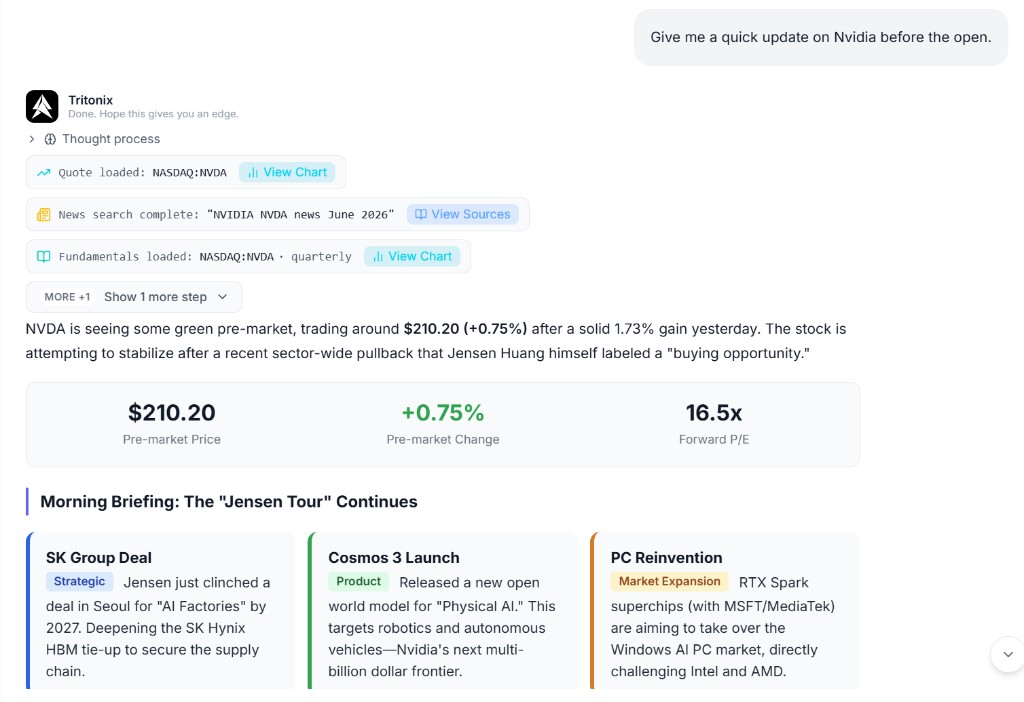
Example: a pre-market Nvidia brief that combines quote data, news, fundamentals, and a structured summary in one response.
What you get back
- A concise summary of what matters now
- A breakdown of earnings, valuation, growth, or risk factors
- A side-by-side comparison when you ask about multiple names
- Suggested follow-up questions if a deeper dive is useful
2. News and Event Interpretation
Use this when the news is moving fast and you want help translating headlines into market impact.
What the Agent uses
- Real-time financial news
- Company announcements and event context
- Web research when a source URL or topic needs more detail
- Market and sector context from live data
Example questions
- "Trump's latest tariff comments: which sectors are most exposed?"
- "Why is oil moving today, and which stocks could react?"
- "Summarize today's top market-moving news in five bullet points."
- "Read this article and tell me what matters for semiconductor names."
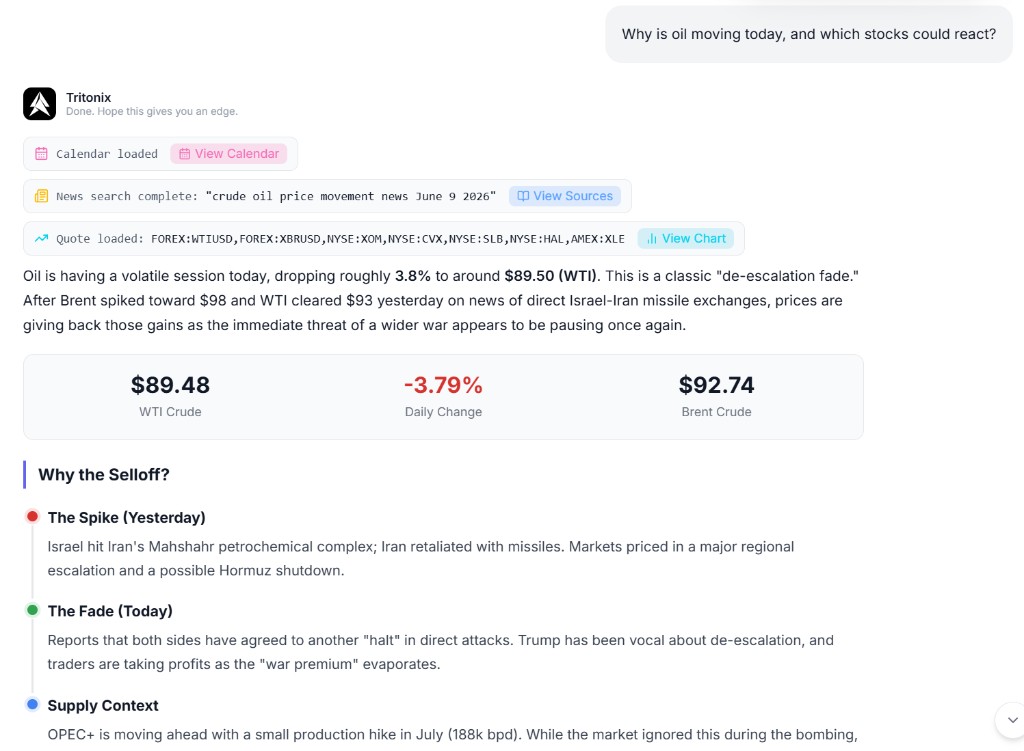
Example: a news-driven market explanation that connects oil price action, event context, and the stocks or sectors most likely to react.
What you get back
- A short explanation of what happened
- The likely impact on sectors, companies, or sentiment
- Links and sources when web research is involved
- A cleaner market narrative without forcing you to read every headline yourself
3. Multi-Asset Screening and Idea Discovery
Use this when you know the kind of opportunity you want, but not the names yet.
What the Agent uses
- Global screener data
- Fundamental, valuation, and technical filters
- Multiple supported markets and asset universes
Example questions
- "Find profitable software stocks with revenue growth above 20% and reasonable valuation."
- "Screen for high-dividend stocks with stable cash flow."
- "Show me oversold large-cap names with improving earnings revisions."
- "Find ETFs with defensive exposure if growth slows."
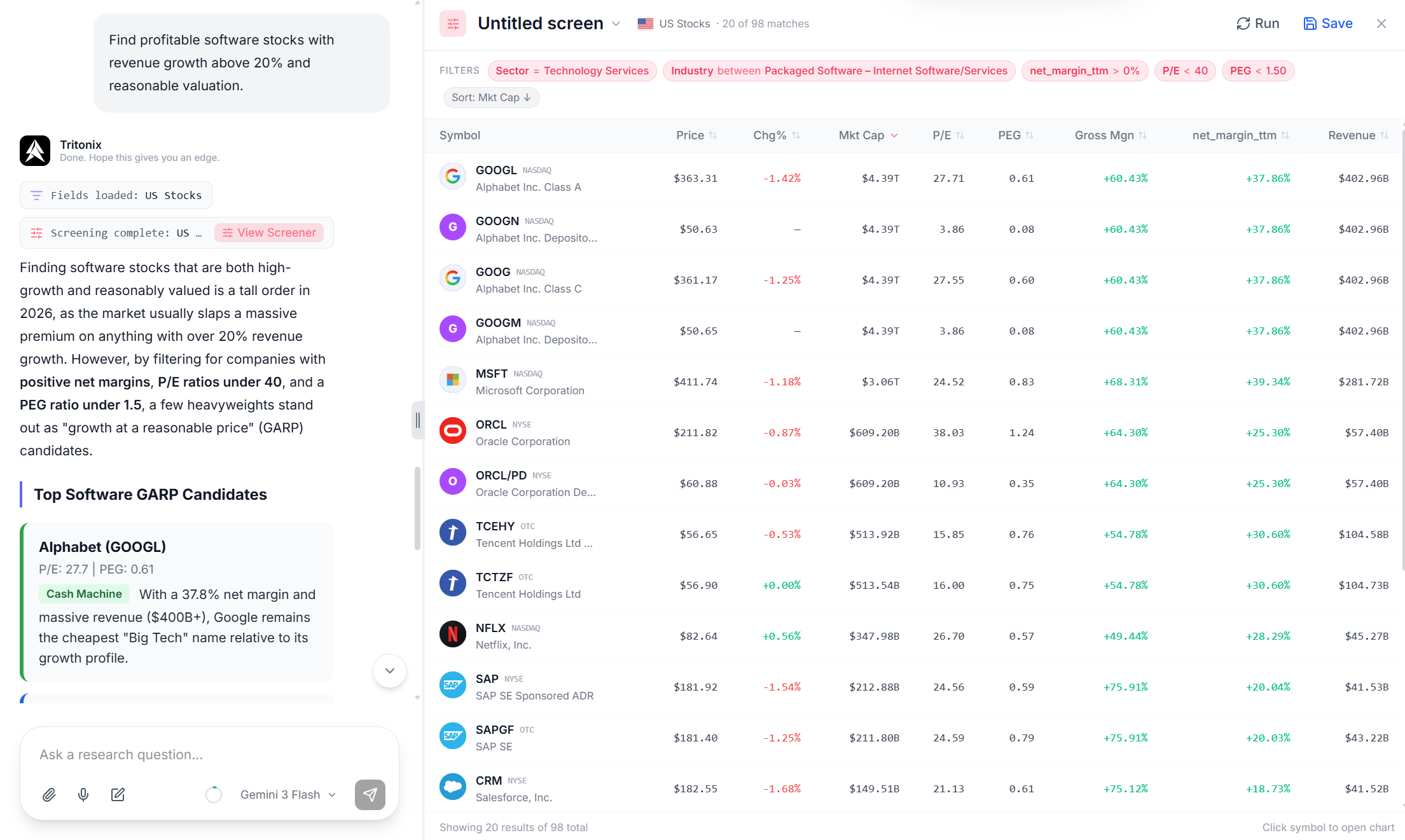
Example: a natural-language screening request turned into a structured market screen, with matching results shown in the Screener panel.
What you get back
- A filtered list of matching assets
- A table in the screener panel when the task becomes structured
- A short explanation of why the results fit the prompt
- Ideas for refining the screen further
4. Macro and Theme Research
Use this when the question is about the bigger picture rather than one ticker.
What the Agent uses
- FRED macro data
- Market news and event calendars
- Prediction market context when relevant
- Cross-asset comparison logic
Example questions
- "What does the latest CPI print imply for rates and equities?"
- "If rate cuts are delayed, which sectors tend to benefit or suffer?"
- "How would a weaker dollar affect gold, exporters, and emerging markets?"
- "Compare the bull case for AI infrastructure versus utilities over the next 12 months."
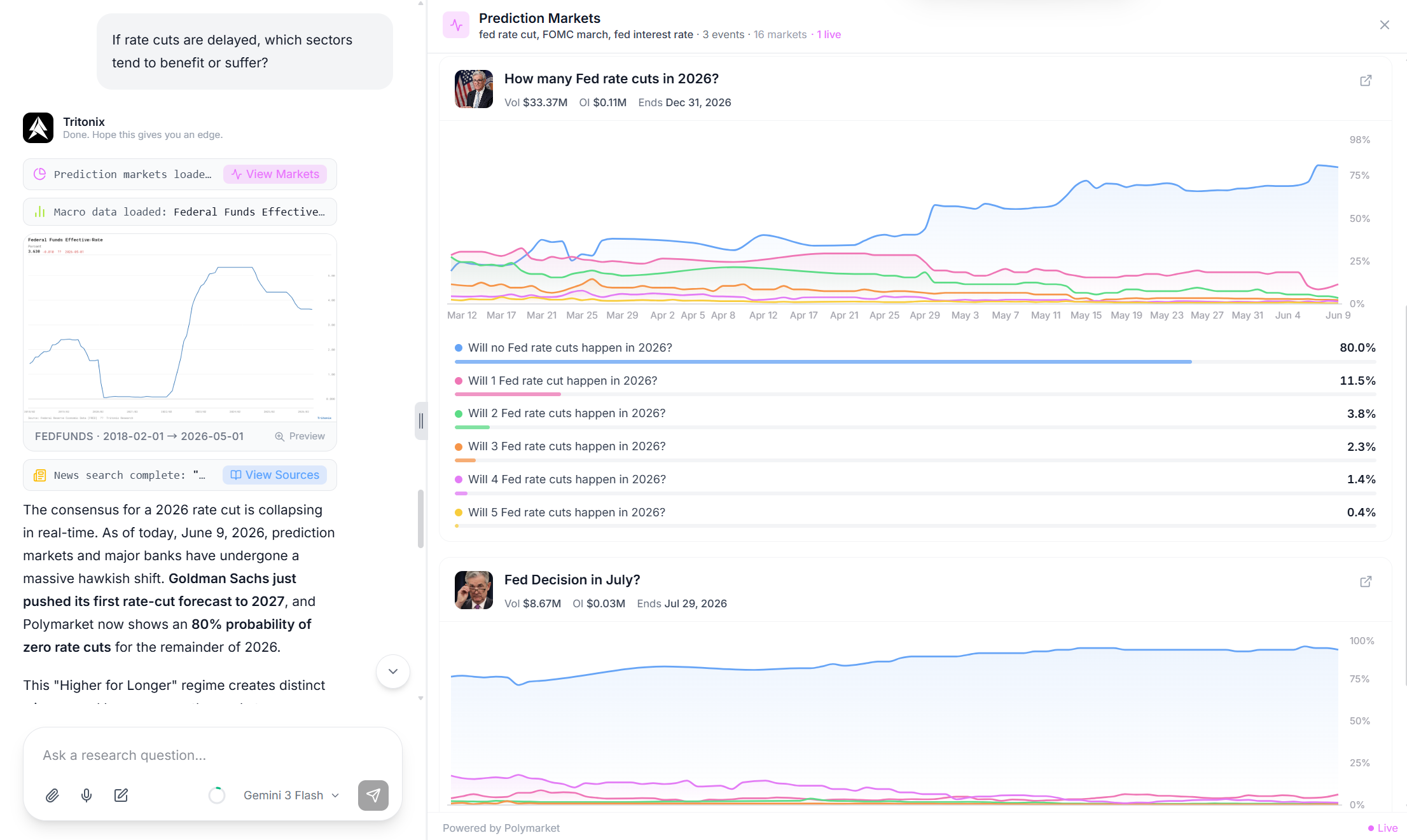
Example: a macro research workflow that combines rate data, prediction markets, and news context to explain how a delayed rate-cut path could affect markets.
What you get back
- A macro interpretation in plain language
- A theme map across sectors or assets
- Supporting data points when available
- A clear list of watch items and catalysts
5. Market Summaries and Report Generation
Use this when you want Tritonix to turn lots of information into a clean output you can read or share.
What the Agent uses
- News, prices, filings, and macro inputs
- Your document library
- Report export tools when needed
Example questions
- "Summarize everything that mattered in markets today."
- "Turn this research into a one-page investment memo."
- "Create a short report on AMD for a team update."
- "Save this thesis to my document library and expand it later."
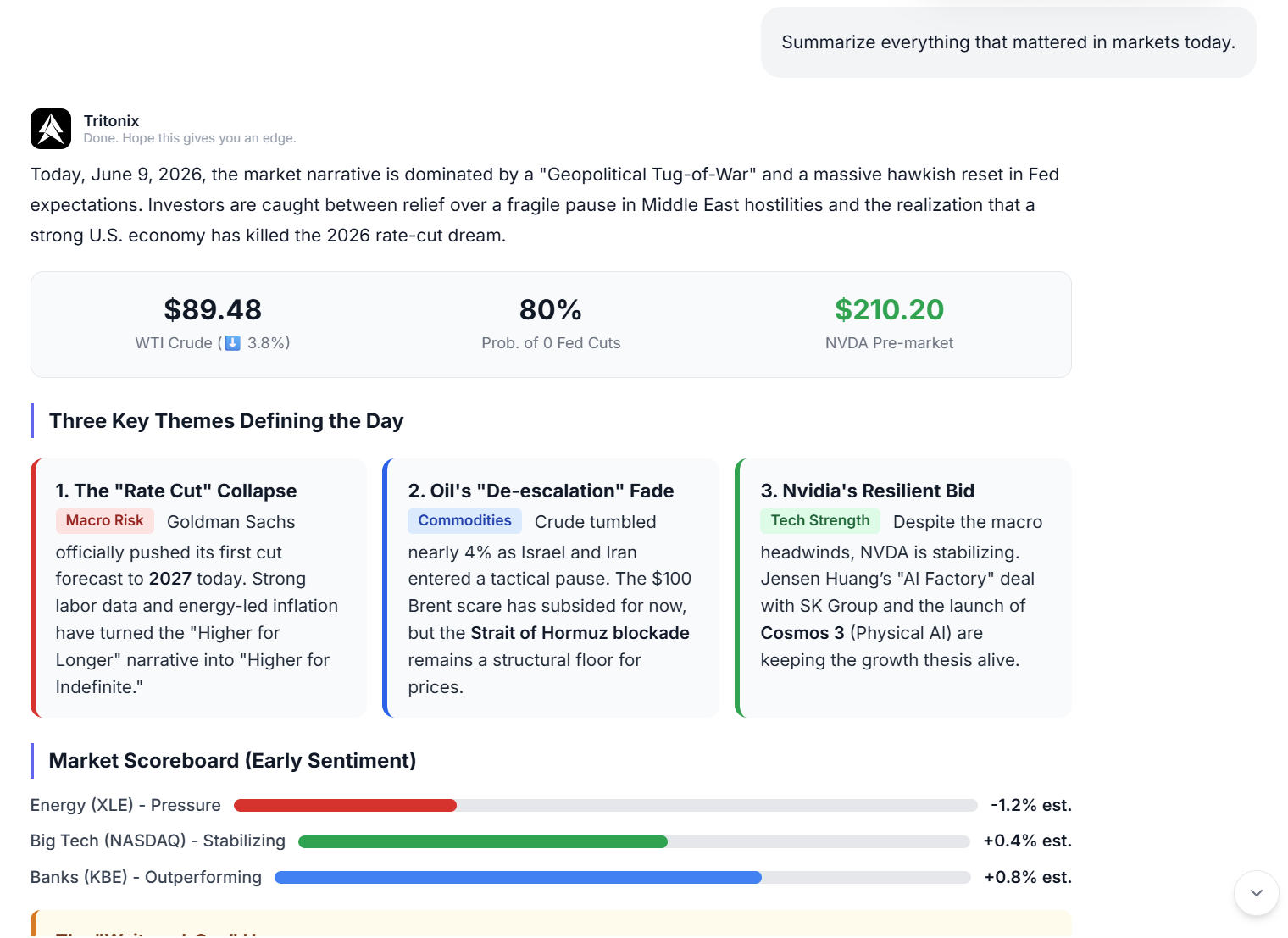
Example: a daily market summary that turns cross-asset moves, macro shifts, and sector leadership into one structured readout.
What you get back
- A clean bullet summary or memo
- A more formal report when needed
- A document saved for later continuation
- A repeatable format for daily or weekly review workflows
6. When a Question Moves Into Advanced Analysis
Some prompts start as normal Q&A and then need deeper tools.
Typical examples
- "Do a technical analysis of TSLA and mark the key levels on the chart."
- "Turn this setup into a chart-backed trade idea."
- "Run this market summary every morning before the open."
What happens next
- Chart-native technical work stays in the same Studio chat, with markup and a Trade Idea
- Recurring requests can become Scheduled Tasks
- A chart setup can become a draft for Publish Idea
Related guides:
Data Coverage at a Glance
Across these question types, Tritonix Investment Agent can draw from:
- Stocks, ETFs, and supported global equity universes
- Crypto and cross-asset market context
- Price charts and technical indicators
- Financial statements and filings
- Real-time market news
- Market calendars and catalysts
- FRED macro series
- Prediction markets
- Institutional flow signals
- Web pages and URLs
- Your saved research documents
The goal is simple: ask in natural language, and let the Agent turn multiple data sources into one usable answer.