Day Trade Bot
Day Trade Bot
Day Trade Bot is a ready-to-follow multi-name day-trade strategy book. You pick Terra or Sol, inspect the live book, connect a broker, and deploy once so Tritonix can execute entries and exits for you.
This is strategy-style following for a full multi-name book — not a single-ticker bot. Terra typically holds 1–2 days. Sol is higher-frequency and more intraday. Same AI engine and deploy flow, different pace.
Why Users Use Day Trade Bot
Most people want day-trade exposure without sitting in front of charts all session.
Day Trade Bot is built for that:
- It is a full multi-name strategy book, not one ticker
- You choose Terra (steadier, 1–2 day holds) or Sol (faster, more intraday)
- You follow the book through your own broker account
- You can start with an amount that fits you, then scale after you see it run
We are confident in the signal quality behind these books. The simplest way to feel that confidence yourself is to try it: review Open Signal, deploy with a size you are comfortable with, and watch the book work in real time.
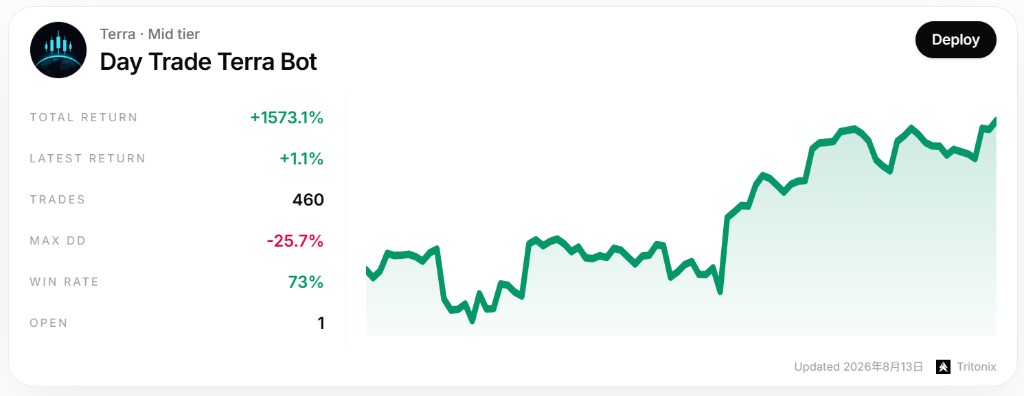
Example: Terra — a steadier day-trade book. Inspect total return, max drawdown, win rate, and open legs before you deploy.
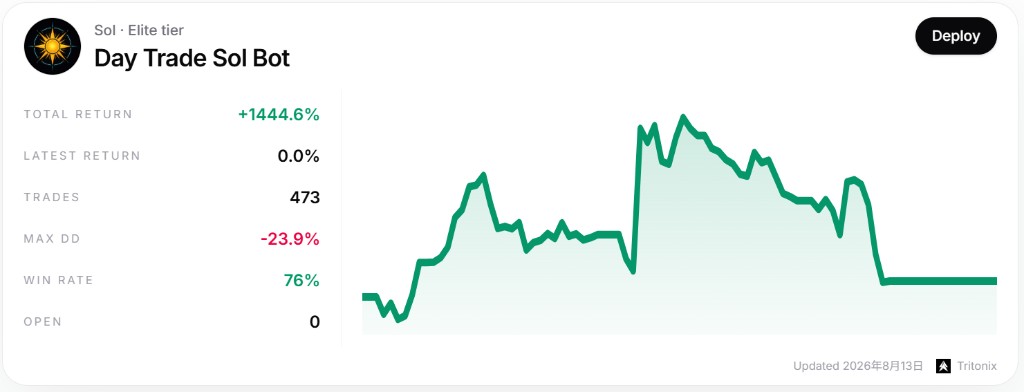
Example: Sol — a faster, more active book. Same deploy flow as Terra, different holding pace.
What This Strategy Is
Think of Day Trade Bot as a managed multi-name day-trade sleeve:
- Multiple liquid US equities can be held at once
- Terra is meant for names that can stay overnight for 1–2 days
- Sol is built for shorter holds and more active signals
- Each leg is managed with the book’s risk process (entries, stops, and exits)
That is the core of this product: AI finds the setup, you deploy once, and the strategy runs without you chasing every candle.
How Following Works (Deploy Step by Step)
Following Day Trade Bot is a short deploy flow:
- Go to Discover → Bot
- Open the Terra or Sol card
- Click Deploy
- Connect a supported broker if you have not already, then select the account
- Enter the amount you want this book to manage
- Review the summary and confirm
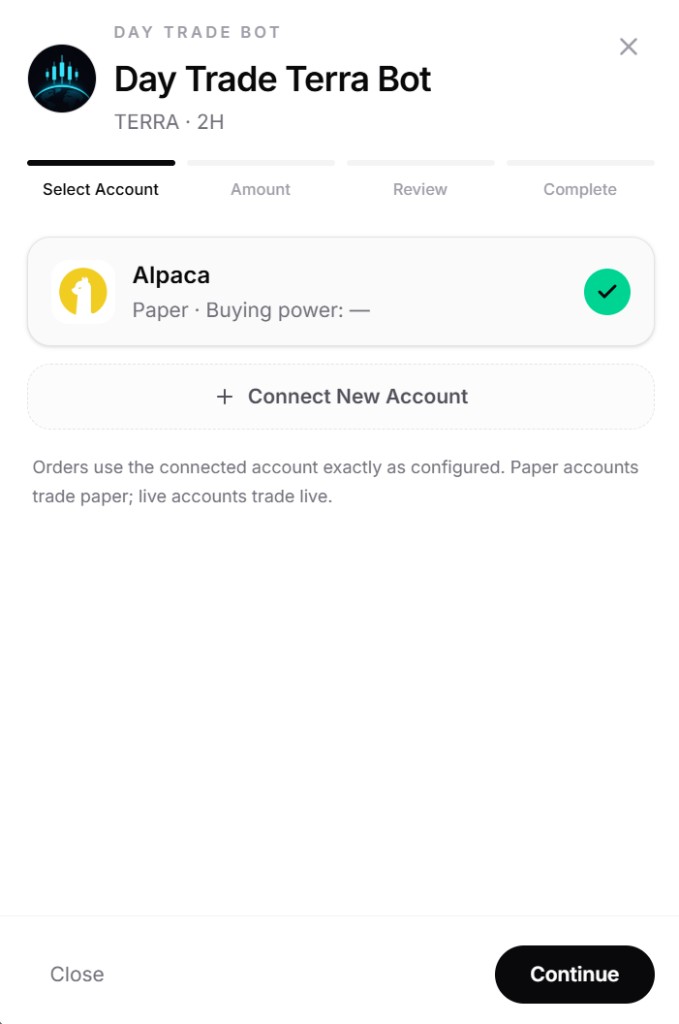
Example: Deploy step 1 — choose a connected brokerage account (paper or live), then continue to set amount.
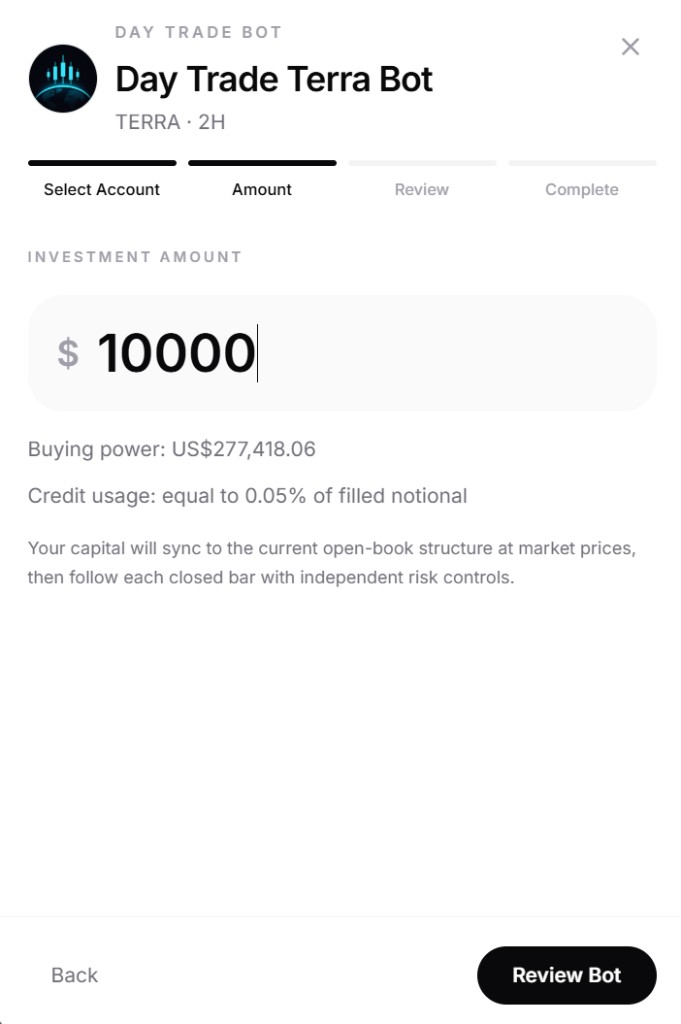
Example: Deploy step 2 — set the capital this book should manage, then review and confirm.
After deploy:
- The bot can open and close legs for you through the connected account
- You do not need to click Buy/Sell for every name yourself
- You can pause, stop, or exit later from My Automation Bots
The flow is simply: connect broker → set amount → confirm. After that, the selected book runs for you.
How the Bot Operates and Makes Money
After you deploy Terra or Sol:
- The book reviews its target sleeve of names and reads live signals
- When signals call for new exposure, the bot opens legs using the capital you assigned
- When a leg should exit, the bot closes it for you
- Profit comes from the book’s edge over a series of trades — not from one magical ticker
No strategy wins every trade. The point of a high-conviction day-trade book is that the process is built for a strong win-rate profile across many managed legs. We are confident in those signals; trying the book is the fastest way to see that for yourself.
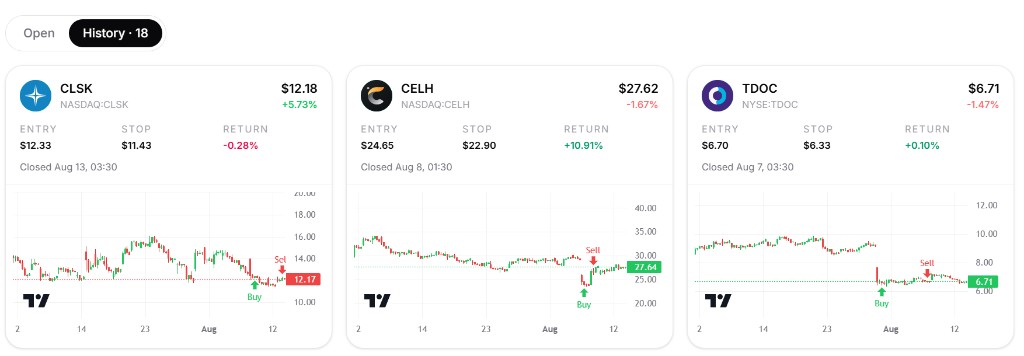
Example: History view with Buy/Sell markers on completed legs across multiple names.
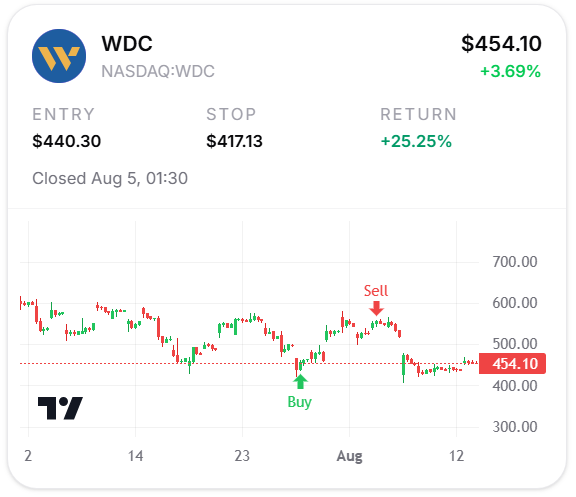
Example: a closed leg with entry, stop, return, and the Buy/Sell markers on the chart.
Open Signal: See the Live Book First
Before or after you deploy, use Open Signal on the Bot page.
Open Signal shows the live open legs across the automation books, including Terra and Sol. It is the clearest way to understand what each book looks like in practice:
- Which names the book is currently holding
- Entry context and live return on each leg
- How the multi-name sleeve looks as a whole
If you are new, start here. Browse free, build confidence, then deploy.
You Stay in Control
Deploying does not mean giving up control of your account.
You can:
- Choose Terra or Sol, and the capital assigned to that book
- Pause the bot when you want new entries to stop
- Stop the book when you want it to wind down cleanly
- Exit when you want to flatten the bot-managed sleeve
Management lives in My Automation Bots on Discover. Equity, invested amount, PnL, and next-run timing are visible there.
A Practical Way to Start
If this is your first time following Day Trade Bot:
- Open Discover → Bot and compare Terra and Sol
- Check Open Signal so you understand the live multi-name sleeve
- Connect a supported broker
- Deploy with a small, comfortable amount
- Watch a few sessions in My Automation Bots
- Increase size only after you are happy with how it runs
Trial browsing of signals is free. There is little reason not to try — users who start small usually understand the product much faster than users who only read about it.
Confidence, Not Hype
We encourage users to use Day Trade Bot because we are confident in the underlying signals and in the Terra / Sol process.
That confidence is not a promise of guaranteed profit. Markets change. Your results can differ with timing, fills, and account conditions.
The honest recommendation is still simple:
- Terra is built for 1–2 day holds; Sol is the faster, more intraday book
- Following through deploy is practical for ordinary brokerage users
- Start free with Open Signal, then deploy when ready
Related Guides
- Connect a supported broker first: Connectors
- For a daily multi-name swing book: Swing Trade Bot
- For another follow-style workflow on Discover: Copy Trade
- Back to product: Discover Bot