Connectors
Connectors
Connectors let you link external platforms to Tritonix so your research workflow can move beyond chat and into execution, data sync, publishing, and automation.
If you think of the Agent as the brain, connectors are what let it reach the tools and accounts around your workflow.
What Connectors Are For
Most users use connectors for one of these goals:
- Connect a broker so research can turn into trading actions
- Pull in account context such as balances, positions, and portfolio activity
- Connect productivity tools so the Agent can write into your workspace
- Connect publishing channels so research outputs can be sent to outside platforms
In short, connectors make Tritonix more useful in the real workflow after you get an answer.
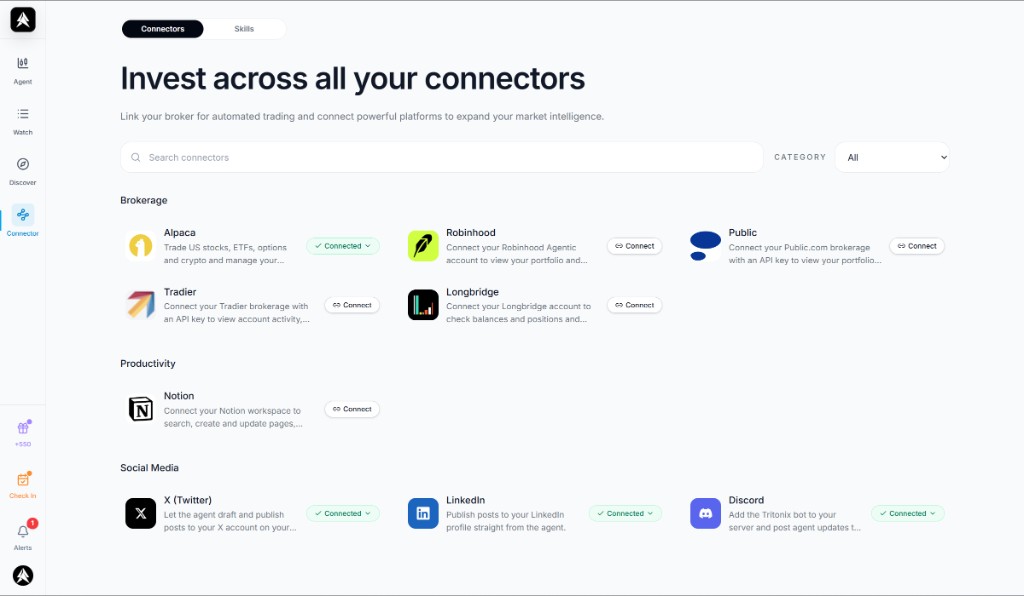
Example: the Connectors page groups available integrations by category so you can see what is already connected and what can be added next.
Where to Find Them
Open the Connectors page at /connector.
From there you can:
- Browse available integrations by category
- Search connectors by name
- Filter by category
- See which ones are already connected
- Open a connector to connect or disconnect it
What You Can Connect
The exact list can evolve over time, but the current page is organized around categories like these.
Brokerage
Brokerage connectors are the most important for users who want Tritonix to move from research into action.
Examples on the page include:
- Alpaca
- Robinhood
- Public
- Tradier
- Longbridge
These are useful for:
- Connecting your account for trading workflows
- Viewing balances, positions, or account context inside Tritonix
- Using broker-linked experiences such as trade flows and copy-trade style actions when supported
Productivity
Productivity connectors are for users who want research to flow into their work tools.
Examples on the page include:
- Notion
These are useful for:
- Sending research into docs or workspace systems
- Keeping notes, plans, or outputs in the tools you already use
- Reducing copy-paste between Tritonix and your working environment
Social Media
Social connectors help you publish or distribute research outputs.
Examples on the page include:
- X (Twitter)
- Discord
These are useful for:
- Drafting and publishing content from Agent outputs
- Sharing research faster without rewriting it in another app
- Keeping your publishing workflow tied to the same research session
Why This Matters to a User
Without connectors, Tritonix is mainly a research environment.
With connectors, Tritonix becomes much more practical because it can help you:
- Go from an idea to a broker-connected action
- Keep research and execution closer together
- Bring account context into your analysis flow
- Push finished outputs into docs or social channels
- Build a more complete workflow instead of stopping at “here is the answer”
For many users, this is the difference between a useful AI tool and a usable investing workspace.
What the Connected State Means
When a connector shows as connected, it means Tritonix can use that integration in the workflows it supports.
Typical outcomes include:
- Broker accounts becoming available in trade-related UI
- Connected services appearing in action flows or publishing flows
- Less manual switching between Tritonix and the external platform
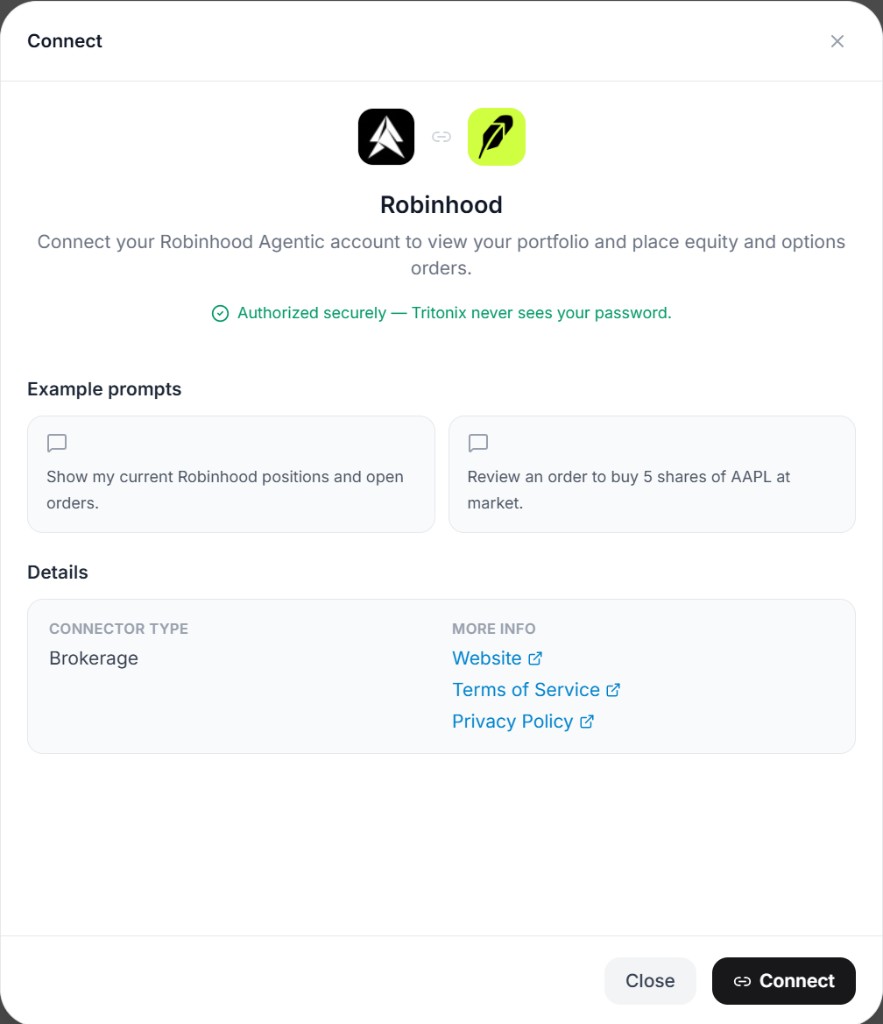
Example: opening a connector shows what the integration is for, how Tritonix will use it, and example prompts you can try after connecting.
You can also disconnect connectors from the same page when you no longer want Tritonix to use them.
A Good Way to Start
If you are not sure where to begin, this is a practical order:
- Connect your main brokerage first
- Add one productivity tool if you save research externally
- Add one social connector if you publish market commentary
- Return to Tritonix workflows and see where those connected accounts now appear
This keeps setup lightweight while still unlocking the highest-value integrations first.
Related Guides
- For broker-linked chart and trade workflows: Asset Panel
- For consensus portfolio workflows: AI Consensus Stock Pick
- For institution tracking and copy-trade style research: Institutional Smart Money