Calendar Panel
Calendar Panel
The Calendar Panel is a side panel in Tritonix that lets you browse market events in a structured calendar view without leaving the conversation.
It is especially useful when your question involves:
- Economic events and macro releases
- Earnings calendars
- Dividend calendars
- IPO calendars
How It Opens
The panel opens when the Agent runs a market calendar query and you click View Calendar in the conversation.
Typical prompts include:
- "Show me this week's key US economic events."
- "What earnings are coming up this week in US stocks?"
- "Which dividend dates matter this week?"
- "Show me upcoming IPOs in the US market."
Tabs
The panel supports four calendar types:
- Economic — macro releases and economic events
- Earnings — company earnings events
- Dividends — upcoming and recent dividend dates
- IPO — upcoming and recent IPO listings
You can switch tabs at any time without closing the panel.
Date Navigation
At the top of the panel, you can:
- Jump back to Today
- Move to the previous or next week
- Click the week range to show the full week
- Click a specific day chip to narrow the panel to one calendar day
This makes it easy to move between a broad weekly view and a focused day view.
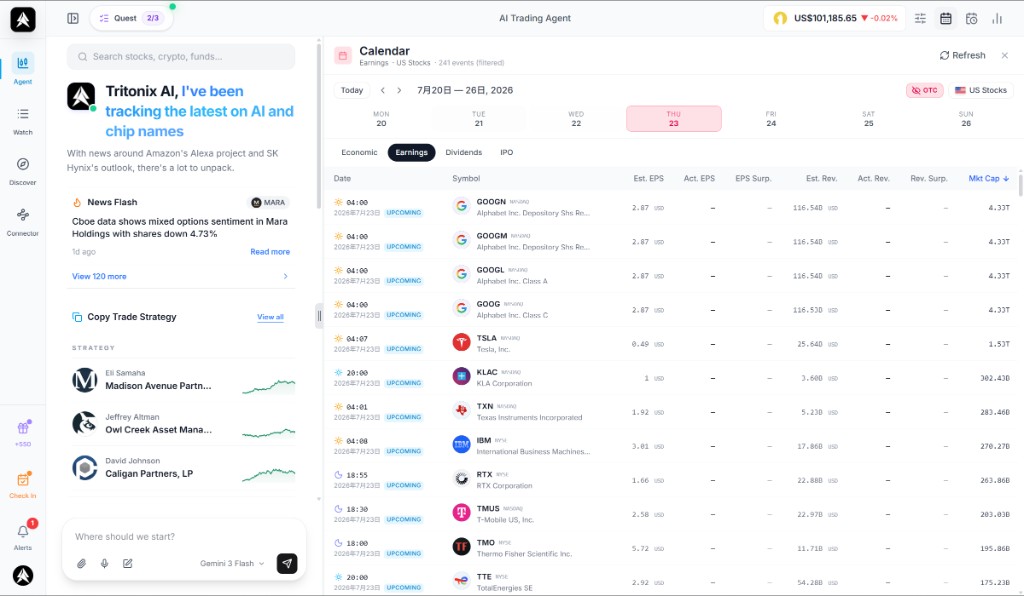
Example: the Calendar Panel can show an earnings week view with date chips, market filters, OTC toggle, and the full earnings event table in one place.
Filters
The available filters depend on the active tab.
Economic tab
- Country selector — choose the country or region for economic events
- Importance filter — show only medium and high importance events when needed
Earnings, Dividends, and IPO tabs
- Market selector — switch between supported equity markets
- OTC toggle on the Earnings tab — hide OTC names for a cleaner research view
What You See in Each Tab
Economic
The Economic tab shows:
- Event time
- Importance level
- Event name
- Actual, forecast, and prior values
- Source links when available
Earnings
The Earnings tab shows:
- Release time
- Symbol and company
- Estimated and actual EPS
- Estimated and actual revenue
- Surprise percentages
- Market cap
Dividends
The Dividends tab shows:
- Symbol and company
- Dividend amount
- Ex-date
- Payment date
- Yield
IPO
The IPO tab shows:
- Date
- Symbol and company
- Exchange
- Offer price
- Shares offered
- Deal amount
- Market cap
Opening a Chart from the Calendar
For earnings, dividends, and IPO rows, you can click the symbol to open the related chart directly in Tritonix.
This is useful when you want to move from an event list into price action and chart review immediately.
Refreshing and Closing
- Click Refresh to reload the current calendar view
- Click the × button in the top-right corner to close the panel
The panel keeps the current tab and date context while you work through the same research flow.